Delete Your Account
We're sorry to see you go. This page explains how to delete your PeekChef account and what happens when you do.
How to Delete Your Account
Account deletion is available directly within the PeekChef app. Follow these two steps:
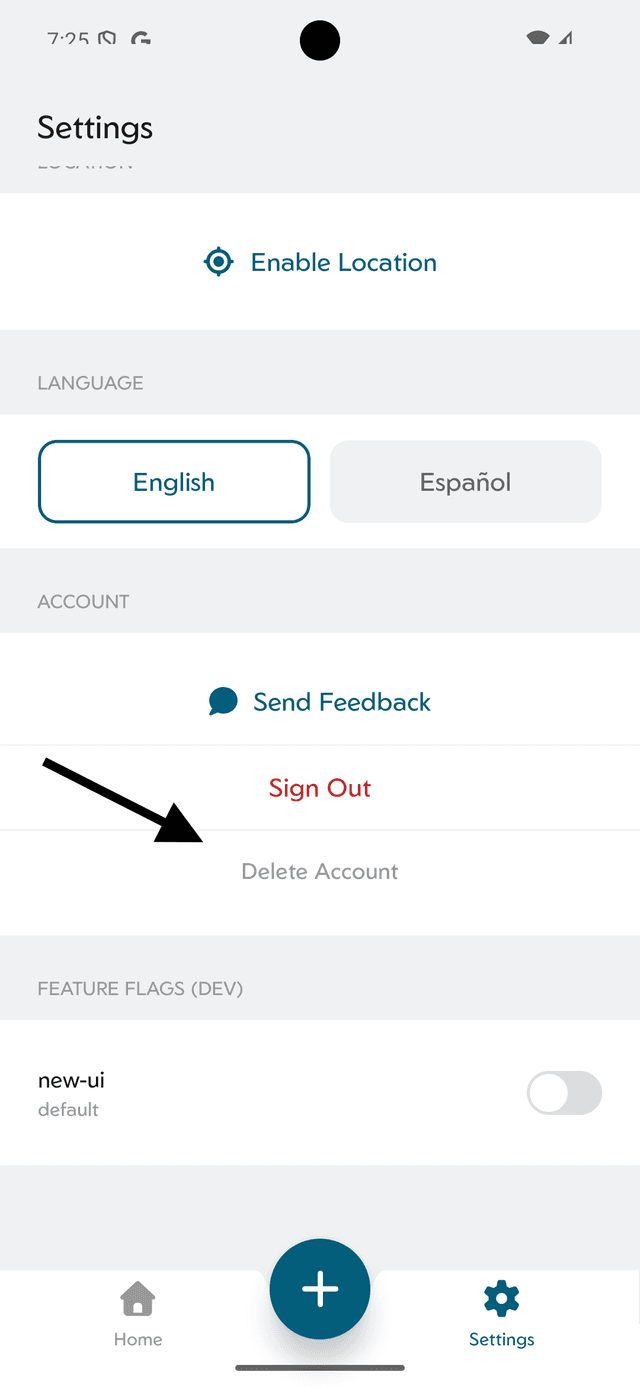
Step 1: Find "Delete Account"
- Open the PeekChef app on your device.
- Tap the Settings tab (the gear icon in the bottom navigation bar).
- Scroll down to the Account section at the bottom of the screen.
- Tap "Delete Account" — it appears in grey text just below the "Sign Out" button.
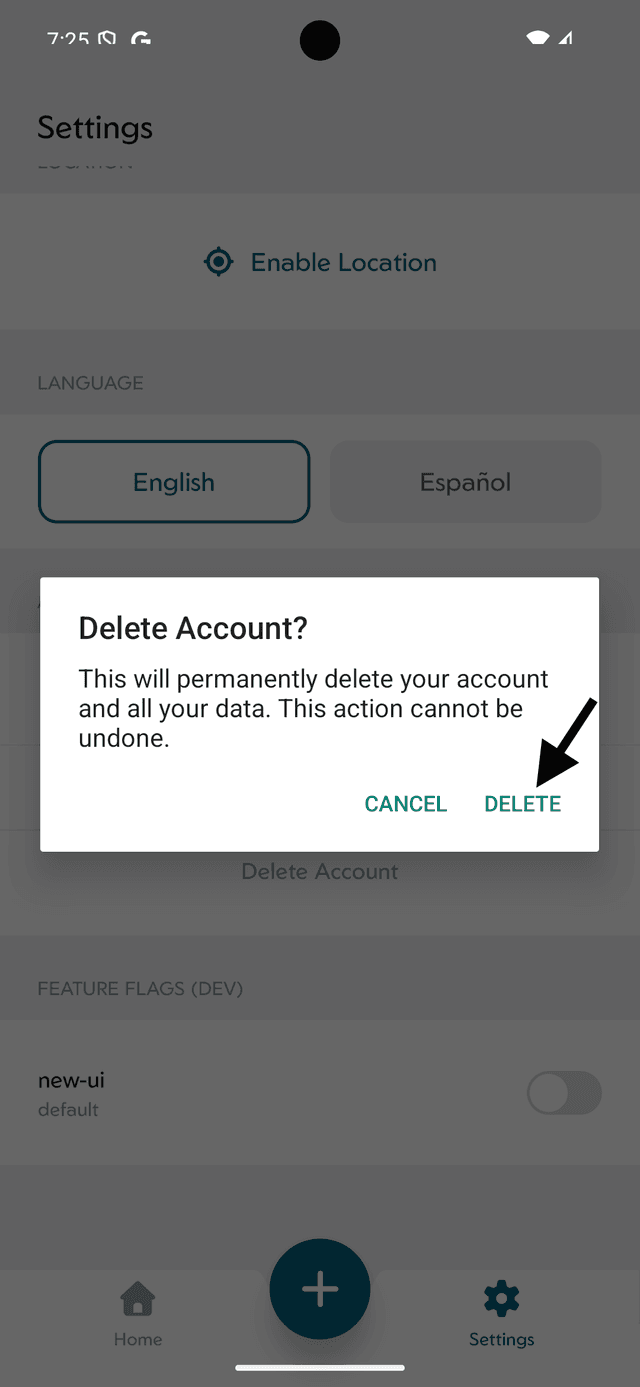
Step 2: Confirm Deletion
A confirmation dialog will appear with the message:
"This will permanently delete your account and all your data. This action cannot be undone."
Tap "Delete" to confirm. Your account and all associated data will be deleted immediately. You will be signed out and returned to the sign-in screen.
What Data Is Deleted
When you delete your account, all of the following data is permanently removed from our servers:
- Your account profile — email address, name, and sign-in credentials
- Household preferences — number of people, cooking skill level, dietary restrictions, appliances, and meal schedules
- All recipe generations — every recipe request you've made, including the ingredients that were identified and the recipes that were generated
- Saved and favourite recipes — any recipes you've bookmarked or marked as favourites
- Taste profile — AI-generated preferences built from your recipe history
- Feedback and ratings — any thumbs up/down ratings or comments you've submitted on recipes
- Bug reports and feature requests — any tester feedback you've submitted through the app
- Subscription information — your subscription tier record (note: if you have an active subscription through the App Store or Google Play, you must also cancel it separately through your device's subscription settings to stop future charges)
- Notification preferences — your "what's new" read status and settings
- Your Firebase authentication account — your sign-in record is removed from our authentication provider
What Is Not Deleted
- Anonymized analytics data — aggregated, non-identifiable usage statistics collected through PostHog are retained for product improvement purposes. This data cannot be linked back to you.
- App Store or Google Play subscriptions — deleting your PeekChef account does not automatically cancel an active subscription managed by the App Store or Google Play. Please cancel your subscription through your device's subscription settings before or after deleting your account to avoid being charged.
Important Things to Know
- Account deletion is permanent and irreversible. There is no way to recover your account or data after deletion.
- Deletion happens immediately upon confirmation. All data is removed from our database in a single atomic operation.
- Photos you uploaded for ingredient recognition are never permanently stored — they are processed in real time and discarded immediately after analysis, regardless of whether you delete your account.
- If you signed in with Google or Apple, deleting your PeekChef account does not affect your Google or Apple account.
Need Help?
If you are unable to access the app or need assistance deleting your account, contact us at support@peekchef.com and we will process your deletion request within 30 days.
For more information about how we handle your data, see our Privacy Policy.